Location of this document:
http://instrumentation.obs.carnegiescience.edu/Software/ZWO/zwogcam.html
TCP/IP Interface
Starting the GUI
- Startup the ZwoGcam GUI:
- ./gcamzwo -t2 -h raspberrypi
- "-m" mode:

- -m2: 1000x1000, 2x2 binned (500x500 GUI image)
- -m3: 1512x1512, 2x2 binned (504x504 GUI image)
- -m4: 2000x2000, 2x2 binned (500x500 GUI image)
- -m5: 2520x2520, 2x2 binned (504x504 GUI image)
- -mh: high resolution: 2048x2048, 1x1 binned (512x512 GUI image)
- -mf: full field: 2400x2400, 2x2 binned (600x600 GUI image)
- default: 1800x1800, 2x2 binned (600x600 GUI image)
-
- "-f" file (located in GCAMZWOINI or /opt/gcamzwo if not set)
- load configuration from ASCII file containing one 'keyword value' pair
per line; e.g.
pfs.ini:
- host lab-pi-01: RaspberryPi host name ("-h")
- port 1: rotator port ("-p")
- mode 2: image geometry mode: 1000x1000 ("-m")

- gnum 3: guider number ("-g")
- gmode 4: guider mode ('gm')
- gmpar t: guider mode parameter ('gm')
- angle -128: "-a"
- elsign -1: "-e"
- rosign 0: "-r"
- parity -1: "-i"
- offx -10: "-o"
- offy 85: "-o"
- px 53: pixel scale [milli-arcsec] ('px')
- lmag: lupe magnification ('lmag')
- pct 60: percent scaling ('pct)
- bkg 24: background scaling ('bkg')
- span 5000: imacs scaling ('span')
- bx 41: guide box size ('bx')
- gain lo: amplifier gain ('gain')
- sw 6: slit width, used for fit in 'gm4' ('sw')
- sn 0.7: guider control loop sensitivity ('sn')
- exptime 0.5: exposure time in seconds ('exptime')
- name IMACS_SH: guider name, shown in the title bar and log
- image_port 52300: base port of the
image server; the server listens on
image_port+gnum. 0 disables it.
[default=52300]
- tcs_age 1.0: how long the telescope block in the FITS header
may be reused before it is re-read from the TCS [seconds].
Shared by every image-server client, so the TCS sees at most one
refresh per tcs_age however many clients are connected, and
none at all when nobody is pulling. The TCS updates no value more
than 5 times per second, so values below 0.2 buy nothing.
0 refreshes on every request. [default=1.0]
- send_host lab-pi-01, send_port 5000: destination of the
deprecated 'send' push. Superseded by the image server and
scheduled for removal.
"-h" host:
hostname (IP number) of the zwoserver computer (RaspberryPi)
"-t" telescope:
-t2: Clay (host=mag2tcs, port=5801 or 5810+rotatorPort)
-t1: Baade (host=mag1tcs, port=5801)
-t0: no telescope [default]
"-g" # {1,2,3}:
guider (camera) number
"-o" dx,dy :
Window offset on the CMOS array.
"-p" #
rotator port. If set it will be used to calculate the TCS port
(5810+rotatorPort).
"-a" angle {-360..+360} : [default=-120]
constant angle in the camera angle formula 'PA = angle +elsign*ELEVATION +rosign*ROTATORE'
"-e" elsign { -1 , +1 , 0 }: [default=-1]
elevation sign in the camera angle formula 'PA = angle +elsign*ELEVATION +rosign*ROTATORE'
"-r" rosign { -1 , +1 , 0 }: [default=0]
rotator sign in the camera angle formula 'PA = angle +elsign*ELEVATION +rosign*ROTATORE'
"-i" parity { -1 , +1 }: [default=+1]
Parity for the compass "L" display.
"-v": vertical layout
GUI Elements
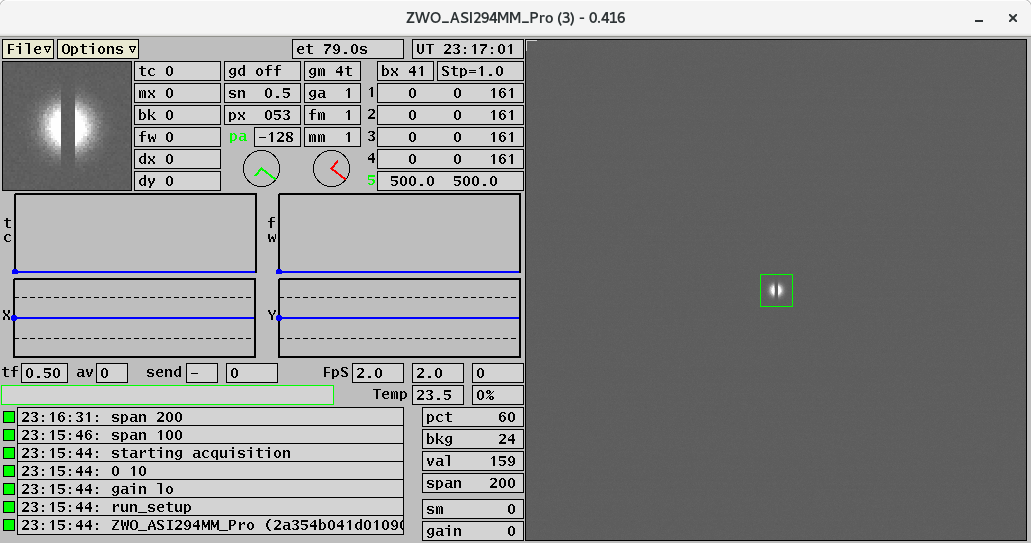
-
- tf: exposure time, current time, frame number
- av: number of frames averaged
- send: seconds until next send;
number of the last frame sent
-
- FpS: frames per second (acquisition, display, guiding)
- The maximum display frame rate may be throttled for better
keyboard response time via the 'dt' command (default=5 Hz)
-
- Temp: CCD temperature [deg.Celsius] and cooler power [percent].
-
Keyboard Commands
- F1
- stop guiding/calculating
- F2
- start calculating the guide corrections
- F3
- start guiding (send corrections to TCS)
- F4
- move the guide-box to the centeroid and then start calculating
- F5
- move the guide-box to the centeroid and the start guiding
- F9
- send 'gpfld#' to the TCSIS, where '#' is the value of '-g gnum'.
- F10
- send 'gpsha#' to the TCSIS, where '#' is the value of '-g gnum'.
- tf #
- set the exposure time to '#' seconds {0.01..30}
- av #
- Average '#' frames (for display and guiding, 0=off)
- dt #
- Throttle the display update frame rate to '#' Hz (default=5)
- apa [#]
- toggle auto-get position angle ('pa') from the TCSIS
- '#' is the optional update period in seconds (default=30)
- pa
- set the position angle manually
- mm #
- set mouse mode {1,2,-2,3}
- left click: move 1/10 of the distance (requires "Control" key)
- left click while holding down the right mouse button: move the full distance
(requires "Control" key)
- 1 (or b): move guider box to the mouse position. Shows "bx" on mm label when active.
- 2 (or p): move guider probe to the mouse position (not available for SV). Shows "pr" on mm label when active.
- -2 (or t): move the SH- and PR-probes and the telescope to the mouse position. Shows "tl" on mm label when active.
- 3 (or c): move the telescope to the mouse position. Shows "pt" on mm label when active.
- gm #
- guider mode (paramter in 'gpaer' command when using mm-2 or mm2).
- sh #
- Shack-Hartman (mask) mode ('flag' in the header when sending data on port 5700).
- xys c x y
- set cursor 'c' to coordinate 'x,y'
- xyr c x y
- move cursor 'c' by 'x,y' pixels
-
-
- send [#]
- send the guider images to the 'SendHost' (Menu: GuiderX--SendHost)
via TCP/IP every '#' seconds; '0' means 'off'.
- Without parameter the GUI will send one file.
- write [#]
- writes the next '#' images to disk as FITS files (default=1)
- tec {#,off,fan_on,fan_off}
- #: Turn on the temperature control at setpoint # [Celsius].
- off: Turn off the temperature control.
- fan_on: Turn on the fan. No temperature control.
- fan_off: Turn off the fan. No temperature control.
- gain {#,# #,lo,med,hi}
- #: set the gain {0..570} and leave the offset as is.
- # #: set the gain {0..570} and offset {0..80}.
- lo: sets the gain/offset to '0 10'.
- med: sets the gain/offset to '150 21'.
- hi: sets the gain/offset to '300 50'.
- sm #
- Smooth the displayed image using the box-car (4,2,1, weights) algorithm,
running '#' iterations ('0' turns off the smoothing).
Please note, this does not affect the guiding.
- sw #
- Set the slit width for the "gm4" fit (default=6 [pixels]).
- fm #
- Function mode: determines the action for the F1 and F3 keys. Shows as "fm gd" or "fm sh" in the fm label box.
- fm1 (or fm gd):
- F1: stop guiding
- F3: start guiding
- fm2 (or fm sh):
- F1: save 'tf(F3)', 'av', 'send' parameters; then restore 'tf(F1)', av=0, send=0
- F3: save 'tf(F1)'; then restore 'tf(F3)', 'av' and 'send' paramters
- mask {on, off, #}
- "on": turn on hot pixel masking
- "off": turn off hot pixel masking
- "#": create a mask using cutoff of #-sigma above the average
- Please use the following procedure for creating a new mask:
- ensure that the camera is well covered (dark) and the cooler is OFF
- "mask off"
- "tf 5"
- "av 5"
- wait at least 1 minute
- "mask 4"
- set "av 0" and "tf" to the desired value
- "mask on"
- The mask will be stored in GCAMZWOPATH or /opt/gcamzwo if not set, as a file named
"zwoSERIALNUMBER_gggg.mask"
and automatically loaded at startup of the zwogcam
('gggg' is the geometry).
- loadfov [file[.fov]]
- Draw the boxes listed in a ds9 region file on top of the image (orange);
without a parameter, remove them. A relative name is looked up in the
gcam data directory (GCAMZWOPATH, /opt/gcamzwo if not set, where the
masks live), an absolute path is used as is; ".fov" is appended when
the name has no extension.
- One entity per line; only "box" is supported:
box x y width height [angle]
in ds9 image coordinates (1-based pixel centre, full size in pixels,
angle in degrees counter-clockwise). The ds9 form
box(x,y,w,h,a) is accepted too. Every other line is
ignored, including the ds9 header lines ("# Region file format",
"global", "image"); keeping them makes the same file loadable in
ds9 on a frame from the image server, in image coordinates.
- Example: llamas.fov,
the 35"x35" LLAMAS IFU footprint on Baade gcam2.
- curcol {dark,light}
- dark: black cursor color
- light: light grey cursor color [default]
- magpix
- Toggle printing the value at the magnifier center pixel
- lmag {1,2,4}
- Set the magnification for the magnifier (lupe) window.
- exit
- Close the GUI immediately (without a confirmation dialog box).
- dspi [config_name]
- Restart the acquisition with optional configuration file.
- Without parameter: restart with current configuration.
- With parameter: load the specified .ini config file (e.g.,
dspi mage loads mage.ini) and restart acquisition.
- Shows an error message if the config file doesn't exist.
- reset
- Same as dspi (alias for restart acquisition).
-
-
TCP/IP Interface
The GUI is listening on port 52200+gnum.
Each command must be terminated
by a [LF] (ASCII=10, 0x0a, '\n') character.
The response string will also be terminated by a [LF].
All communications are initiated by the client (your program).
An easy way to test the interface is the 'nc' (netcat) utility. It can be
run like a terminal emulator (^D terminates the connection) or be used in scripts:
xterm> nc localhost 52201
version
0.332
^D
xterm>
Note: Most commands should work with the TCP/IP interface.
- fone
- equivalent of "F1" on the keyboard.
- returns "OK".
- fthr
- equivalent of "F3" on the keyboard.
- returns "OK".
- version
- returns "0.322"
- status
- returns the current guider state as a single line of
key=value pairs, separated by blanks, e.g.
init=1 loop=1 guiding=3 gm=1 fm=1 mm=1 exptime=0.100 av=0 gain=300
offset=50 send=0 temp=-15.0 setp=-15 cooler=42 cfps=9.98 gfps=9.87
fwhm=1.23 flux=123456 peak=45678 back=1234 dx=+0.12 dy=-0.34 az=+0.051
el=-0.024 x=256.0 y=256.0 bx=15 px=196 pa=45.0 sn=1.0
iport=52300 iclients=0
- init: camera initialized (0/1) –
loop: acquisition loop running (0/1) –
guiding: 0=off, 2..5 = active mode (<F2>..<F5>),
negative while the first correction is still pending –
gm/fm/mm: guide/function/mouse mode –
av: rolling average –
send: send flag –
temp/setp/cooler: last values read by the
housekeeping thread (stale if the cooler is off) –
cfps: camera frame rate, gfps: guider loop rate –
peak: peak pixel –
dx/dy: centroid offset [pixels] –
az/el: last guider correction [arcsec] –
x/y: guide box center [pixels], bx: box size –
px: pixel scale [mas] – pa: position angle –
sn: sensitivity –
iport/iclients: image-server port and connected
clients (see below).
- The photometry fields (fwhm, flux, peak,
back, dx, dy, az, el,
gfps) hold the last measurement; they are only updated while
guiding.
Image Server
A second port serves FITS frames to any number of clients, so a display,
a quicklook tool and a recorder can all read from the guider at once.
It is independent of the command port above and of the (deprecated)
send push.
The port is image_port + gnum, default 52300+gnum.
Set image_port in the configuration file; 0 disables the
server. At most 4 clients may be connected at once; a fifth is refused
with "-Etoo many clients".
There is one command:
- fits [ timeout ]
- Returns "<seq> <ts_ns> <nbytes>[LF]" followed
by nbytes of FITS.
- timeout is how many seconds to wait for a frame newer than the
last one served on this connection. The default, 0, returns
the newest frame available immediately, even if that connection has already
seen it.
- Nothing new within timeout returns "-Enodata". Any
other failure returns "-E<message>", for example
"-EZWO not acquiring" when the exposure loop is stopped.
The guider state travels in the FITS header, so a frame is
self-contained – see FITS Header for the
keywords. They mirror the status command
exactly: both are filled from the same snapshot, so they cannot disagree.
Note: the pixels are the ones the guider works on. They are shifted
right by 2 bits on receipt, and when av is non-zero they are a
rolling average of several exposures – GDAVG says how many,
and FRAMETS is the newest contributing frame. They are not raw
camera values.
src/py/gcamclient.py is a reference client:
./gcamclient.py --host rpi --gnum 3 --count 10 --timeout 2 --out /tmp/f.fits
FITS Header
The same header is written by the write command, served by the
image server, and sent by the deprecated
send push – they share one builder.
Note (v1.1): the header grew from two 2880-byte blocks to three
(5760 → 8640 bytes) to make room for the guider keywords below.
Readers that scan for the END card – any FITS library, and
getimages – are unaffected. A reader that assumes a
fixed-size header, or seeks to the data at a hardcoded offset, must be
updated.
Guider keywords, added in v1.1. They mirror the
status command and are filled from the same
snapshot, so the two cannot disagree:
- GDINIT, GDLOOP: camera initialized / acquisition
loop running (0 or 1)
- GDGUIDE: 0=off, 2..5=active mode (<F2>..<F5>),
negative while the first correction is still pending
- GDMODE, GDFMODE, GDMMODE: guide, function
and mouse mode ('gm', 'fm', 'mm')
- GDAVG: frames in the rolling average ('av')
- GDFWHM [pixels], GDFLUX, GDPEAK,
GDBACK: last measurement
- GDDX, GDDY: centroid offset from the guide box
[pixels]
- GDAZ, GDEL: last correction sent to the telescope
[arcsec]
- GDBOXX, GDBOXY, GDBOXSZ: guide box centre
and size [pixels] ('bx')
- GDPA [deg], GDSENS ('sn'), GDSEND
('send')
- CCDOFFS, TEMPSET [C], COOLER [%],
CAMFPS, GDFPS: camera offset, cooler setpoint and
power, camera and guider-loop frame rates
- FRAMETS: time the zwoserver received the frame from
the camera, in nanoseconds since the epoch. 0 if the server
predates v1.0.5. Under a rolling average this is the newest
contributing frame.
The photometry keywords hold the last measurement and are only
updated while guiding; when the guider has never run they read 0.
Pixel values are not raw camera counts. They are shifted right by
2 bits when received, and with GDAVG > 0 they are a rolling
average of several exposures.
2021-11-09,
Christoph C. Birk, Carnegie Observatories
